

Is a Standing Desk Converter Worth It for Back Pain?
Last Updated: November 22, 2026
Quick Summary
A standing desk converter is worth it for back pain only if you treat it as a tool for position variety rather than a cure. Movement and switching between sitting and standing matter more than standing alone, so adjust it several times a day instead of setting it once.
- A converter is a height-adjustable platform that sits on your existing desk, ideal for renters and shared desks.
- Most converters raise your laptop, not your screen, so add an external keyboard, mouse and laptop riser.
- Rotate 20 to 30 minutes seated, 10 to 15 minutes standing, then take a two-minute walk.
- Choose a dual-column or Z-frame design over a single central column for stability.
- See a clinician first if pain brings numbness, weakness, night waking, or lasts more than a few weeks.
Table of Contents
- Standing Desk vs. Desk Converter: Which Fits Your Back Pain Setup
- Standing Desk Converter Risks and Drawbacks You Should Know
- What Makes the Best Standing Desk Converter for Back Pain
- Setting Up a Standing Desk Converter for Laptop Work
- The Cost Question and When to See a Clinician
- Frequently Asked Questions
Standing Desk vs. Desk Converter: Which Fits Your Back Pain Setup
A standing desk converter is a height-adjustable platform that sits on your existing desk, letting you switch between sitting and standing without buying a new workstation. Whether it helps back pain depends less on the device than on how often you change position; movement and position variety matter more than standing alone.
If you rent, share a desk, or work from a kitchen table, the converter is the practical choice.
| Factor | Standing Desk Converter | Full Standing Desk |
|---|---|---|
| Cost | Lower, one purchase on top of existing desk | Higher, replaces the desk |
| Setup time | Minutes, no tools in most cases | Assembly required |
| Best for | Renters, shared desks, tight spaces | Dedicated home offices |
If you are pairing a converter with a new chair for the seated half of your day, our guide on how to choose an ergonomic office chair for back support walks through the measurements that actually matter.
Standing Desk Converter Risks and Drawbacks You Should Know
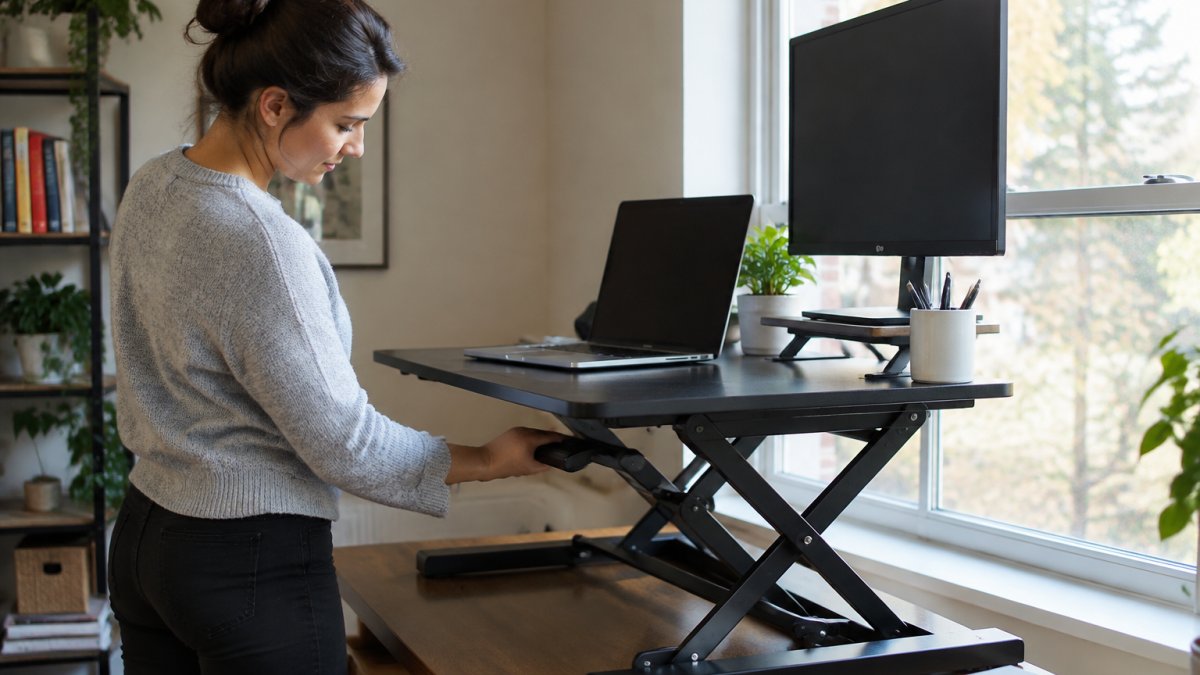
The biggest risk is the posture you adopt on top of it: most converters raise your laptop, not your screen, so you either look down or crane your neck up. A common mistake is setting a converter to standing height once and never lowering it, since standing still can strain the low back and legs much as sitting still does.
If posture problems are established, a converter alone will not correct them. See our guide to fixing poor posture, and if pain is persistent, understand what physical therapy for posture correction can address before spending on equipment.
What Makes the Best Standing Desk Converter for Back Pain
The best standing desk converter for back pain is one you will adjust several times a day, at a height range that fits your body, with enough stability that you forget it is there.
Height range. Your standing height should put the keyboard at roughly elbow height with shoulders relaxed. Stability and weight capacity. Look for a dual-column or Z-frame design rather than a single central column. Keyboard tray depth. The tray should be deep enough for forearms to rest with wrists neutral.
A converter changes your desk geometry but does not loosen a tight upper back. See our guide on using a fascia ring for back flexibility and our roundup of effective tools for chronic back pain relief.
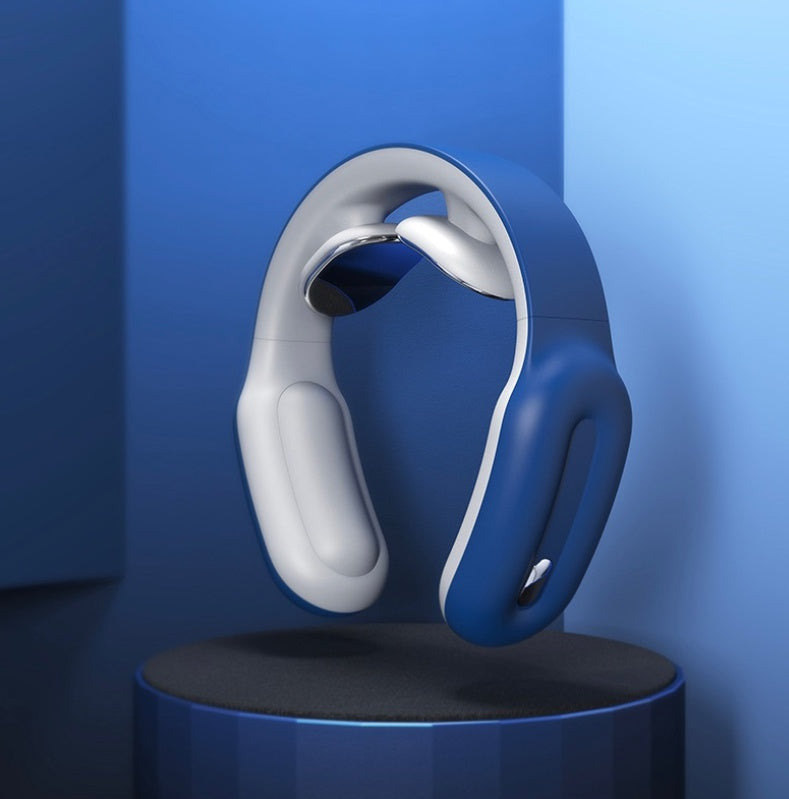
For neck and shoulder tension between position changes, the Intelligent Cervical & Shoulder Massager with Heat and 3 Massage Modes offers 42°C heat, three modes, 15 intensity levels, and a 15-minute auto shut-off. It weighs about 160g. Use it after work, not as a substitute for moving.
Skip if: you have a dedicated office and budget for a full standing desk.
Setting Up a Standing Desk Converter for Laptop Work
A converter set up for a laptop alone puts your neck in flexion all day. Raise the laptop so the screen top sits near eye level, then add an external keyboard and mouse on the lower tray.
A practical sit-stand schedule for back pain. Rotate: 20 to 30 minutes seated, 10 to 15 minutes standing, then a two-minute walk. If you can only manage one change, add the walk.
The Cost Question and When to See a Clinician
Add up the real cost: a converter plus an external keyboard, mouse, laptop riser, and possibly a monitor.
A converter is not a treatment. If your back pain comes with numbness, weakness, pain that wakes you at night, or lasts more than a few weeks, see a clinician before spending on ergonomics.
The honest answer: yes, if you treat a standing desk converter as a tool for variety rather than a cure. FitGlow Fitness Gear offers recovery and personal care products, including the cervical and shoulder massager with heat and a portable massage gun. Start with the massager, add a two-minute walk between position changes, and give it a few weeks. Get started with FitGlow Fitness Gear and build a desk routine your back can live with.
Frequently Asked Questions
Is a standing desk better for lower back pain than sitting all day?
Neither position wins outright. Movement and posture variety are generally considered a bigger factor than standing versus sitting. A standing desk converter helps because it makes switching positions easy, but standing still for hours can also strain your back. Aim to change position every 30 to 45 minutes and pair desk time with short mobility breaks.
Should I get a standing desk or a standing desk converter?
A converter sits on your existing desk and costs less, which suits renters, small apartments, and anyone testing whether standing helps before committing. A full standing desk offers a wider height range and more stability but costs more and requires replacing your desk. If your main goal is testing whether standing reduces your back pain, a converter is the lower-risk first step.
How should I set up a standing desk converter to avoid back pain?
Raise the converter so your elbows sit near 90 degrees and your wrists stay flat on the keyboard. Put your monitor at eye level so you are not looking down, and stand with feet hip-width apart, weight balanced. Keep the keyboard tray close to your body to avoid reaching. If you use a laptop, add an external keyboard so the screen can sit higher without forcing your neck forward.
